 Experience Works
Recipe Tree shopping list
Wiki home · Recipe Tree · Acquisition information
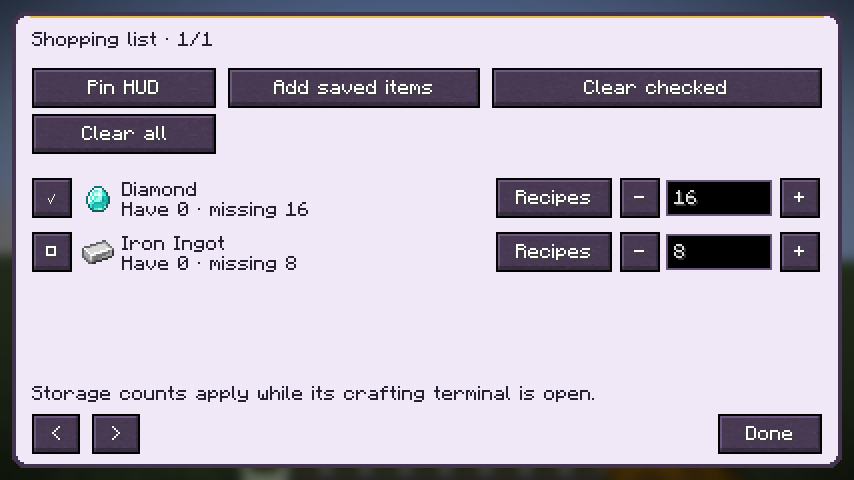
Open Shopping from Recipe Tree. Add saved items adds one of each current bookmark; desired quantities remain separate from favourites. On a recipe page List adds one of the viewed item, while Inputs adds the immediate ingredients for one craft of the displayed recipe. Hover either button for an explanation. Repeated clicks add the same quantities again; these buttons are actions, not toggles. Choose the recipe variant with the normal arrows first. Ingredient alternatives prefer a matching item you already have, otherwise the first displayed alternative. Inspect choices before committing to a large build.
The list displays Have / wanted / missing. Type a desired quantity directly into its number field, or use + and −; decreasing 1 removes the row. Check off rows manually and use Clear checked to remove them. Clear all removes every entry, including unchecked entries, and clears the pinned list. Recipes opens that item's recipes. Pin HUD displays up to seven unchecked items as compact icons with have / wanted counts. The list uses the same tightly fitted background and top-left icon-and-count layout while playing and while an inventory, crafting table, machine or other interface is open. Hover an entry inside an interface to see its item name; unpin from the Shopping List screen. Green counts mean the wanted quantity is available. Large counts are abbreviated with k/M.
Counts include the player's main inventory, the current crafting grid and accessible connected storage while its crafting terminal is open. Storage totals use the terminal's existing deduplicated exact-variant catalogue and available amounts. They are not a global remote scan; closing the terminal leaves inventory counts only. Auto-craftable products that do not exist yet are not counted as owned. No items are reserved, consumed or crafted by pinning a list.
The list persists per world/server alongside Recipe Tree navigation. Limits: 128 item variants, 1,000,000 desired per variant. Counts use exact item components, preserving potion and other variants. There is no XP cost or recipe.
For recursive input planning, open the list while an Enderic crafting terminal is active. Rows within the autocrafting request limit (1,024 by default) offer Plan instead of Recipes. This requests the existing server-side installed-pattern planner's ingredient preview; it detects cycles and reports unavailable patterns/materials. List inputs on that preview adds the required input quantities to your list without queuing a craft. Pattern selection follows your installed patterns; choose different patterns there, or use Recipe Tree's recipe arrows and Inputs for explicit single-recipe choices. The target row is retained until manually removed or checked off. Larger list quantities remain valid but must be planned in smaller requests. No full automatic planning runs outside a compatible terminal.
State and counting · List interface
Shift + middle-click an item in Recipe Tree or its crafting-table panel to bookmark the immediate inputs for one recipe. Existing bookmarks are retained. The displayed recipe is used when it produces that item; otherwise crafting-table recipes take priority, followed by the first available recipe. Ingredient alternatives prefer an item you own, then the first available alternative. This adds input item types, not quantities or recursive sub-ingredients. Ordinary middle-click toggles the item’s own bookmark.
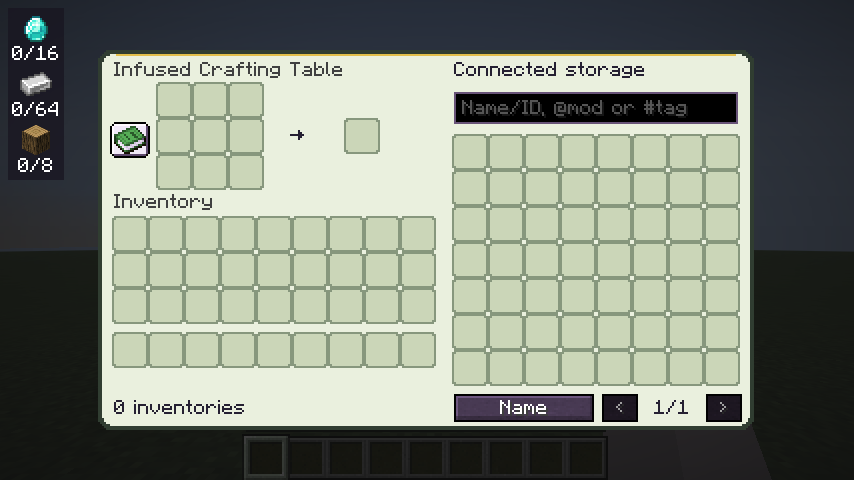
In-game container view: icons and have/wanted counts remain visible beside the crafting screen.